
Available Ways to Access Your Incognito Casino Account
Returning players reach their account through the Login button in our site header. We offer two sign-in methods: email or username combined with a password, and SMS login via a one-time code sent to your registered mobile number. Both routes lead to the same account dashboard, and switching between them requires no additional setup once your phone number is confirmed during registration. All data transmitted during our sign-in process is protected by 256-bit SSL encryption.
| Method | How It Works |
| Email or Username + Password | Enter the email address or username registered to your account along with your password. Standard method; works on desktop and mobile browsers. |
| SMS Code Login | Enter your registered mobile number and receive a one-time code valid for 3 minutes. No password required for this route. |
| Two-Factor Authentication | Optional additional step on offer on top of either method above. Code sent via SMS or generated by an authenticator app after your standard credentials are accepted. |
For UK players using a shared or public device, the SMS code method reduces exposure because no stored password is involved. The Incognito Casino login session remains active for a set period of inactivity before automatically signing out. Logging out manually after each session on a non-personal device is the recommended approach for account security.
Access via Email or Username
The email or username route is the standard sign-in path and works across all devices and browsers without any additional configuration. Your registered email address and the password set during account creation are all that is required. If you registered with a username rather than your email as the primary identifier, either one works in the login field.
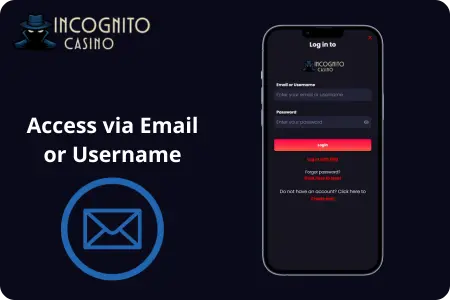
- Email or username field: enter either the email address linked to your account or the username you chose at registration; both are accepted.
- Password field: enter your account password exactly as set. Passwords are case-sensitive, so check caps lock if the first attempt fails.
- Save credentials option: on a personal device, ticking this box keeps your credentials stored so the login form pre-fills on your next visit.
- Forgot password link: located directly below the password field; clicking it opens the recovery flow where you enter your registered email to receive a reset link.
- Two-factor authentication prompt: if you have 2FA set up, a second screen requests the verification code after your password is accepted before access is granted.
UK players who primarily use mobile browsers will find the email or username method works identically on phone and desktop. Our Incognito Casino login form is fully responsive, so no separate mobile site or app download is needed to sign in from a smartphone or tablet.
Sign In with an SMS Code
The SMS login route removes the password step entirely. You enter your registered mobile number, and a 6-digit one-time code is sent to that number within seconds. The code is valid for 3 minutes and can only be used once. This method is particularly practical on mobile devices where typing a full password is inconvenient, and it also functions as a form of two-factor verification by linking access directly to your physical device.
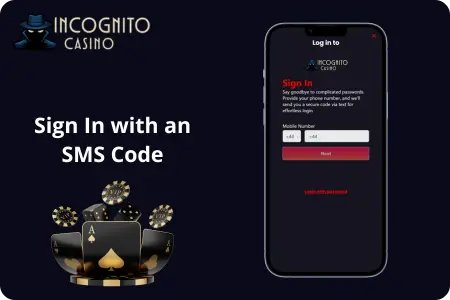
- Mobile number field: enter the phone number registered to your Incognito Casino login account, including the UK country code where required.
- Request code: tap the Send Code button; the 6-digit code arrives by SMS within approximately 12 seconds on a standard 4G connection.
- Code validity: 3 minutes from the time the code is issued; if it expires before you enter it, request a new one from the same screen.
- Attempt limit: 3 incorrect code entries trigger a temporary lockout on the SMS method; wait a few minutes before requesting a fresh code.
- Fallback: if the SMS does not arrive, check that your registered number is correct in account settings, or use the email and password method as an alternative.
The SMS method works whether or not you have a password set, making it a practical primary route for players who prefer not to manage a separate password for their account. For UK players who regularly deposit on mobile, the Incognito Casino login via SMS typically saves a step compared to typing credentials on a small keyboard.
Password Recovery and Account Access Help
If your password is lost or your account is locked, we handle recovery through a reset link sent to your registered email address. The link is time-limited and expires if not used promptly, so acting on the email as soon as it arrives avoids a second request. For issues beyond a forgotten password, our live chat and email support are reachable directly from the site without needing to sign in first.
| Issue | Resolution |
| Forgotten password | Click Forgot Password on the login screen; enter your registered email address to receive a time-limited reset link. |
| Reset link not received | Check the spam or junk folder. If absent after 5 minutes, request a second link or contact support with your registered email address ready. |
| Locked account after failed attempts | Wait for the lockout period to clear automatically, or contact live chat to request manual lift with identity confirmation. |
| SMS code not arriving | Confirm your registered mobile number is correct in account settings; switch to email and password login as an alternative. |
| Cannot recall registered email | Contact support via live chat; have any other account details ready such as your username or last deposit method to confirm identity. |
| Account suspended | Reach support by email for a written record of the resolution process; response times for suspension queries are typically longer than live chat. |
UK players dealing with a locked or suspended account should contact support by email rather than live chat when a written record of the exchange is needed. The support team requests identity confirmation before making any changes to login credentials or account status. Having your registered email, username, and last deposit method on hand shortens the verification process for a blocked Incognito Casino login significantly.
Step by Step Incognito Casino Login Process
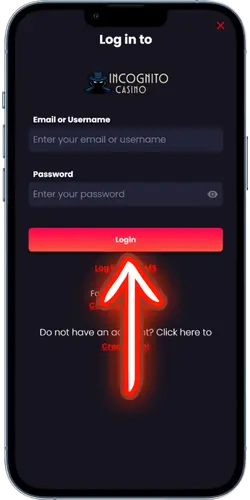
The sign-in process from start to account access takes under a minute under normal conditions. Our Incognito Casino login form sits in the site header and loads on the same page without redirecting to a separate URL, so there is no waiting on page transitions between steps. The steps below follow the email and password route; the SMS method replaces steps two and three with the code request flow described above.
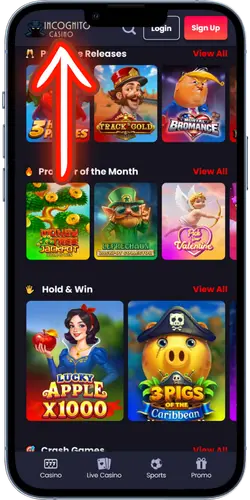
- Go to the official site
Open the official Incognito Casino site in your browser. The Login button sits in the top-right corner of the header and is visible on every page without scrolling.

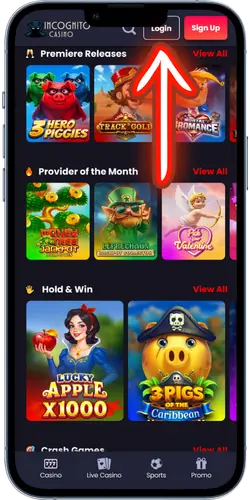
- Click the Login button
Tap or click Login to open the sign-in form. Choose your preferred method: email or username with password, or SMS code. The form loads in a modal overlay without leaving the current page.
- Enter your credentials and sign in
Type your email or username and password Incognito Casino login, then click Sign In. If 2FA is active, enter the verification code on the next screen. Your account dashboard loads immediately on successful sign-in, with your balance and active bonuses visible.
Once inside, the account dashboard shows your current GBP balance, any active bonuses with their remaining wagering progress, and your transaction history. From there you can go directly to the game lobby, the cashier, or the Promotions section without needing to pass through additional verification. UK players who enable 2FA will see the extra code step on every Incognito Casino login, which adds roughly 10 to 15 seconds to the total sign-in time.
Registration for New Players
Players who do not yet have an account can register directly from the Sign Up button in the site header. The process is split into a small number of steps and takes under 2 minutes to complete. Account confirmation arrives by email or SMS depending on the option you choose, and the link must be clicked before the first deposit can be processed. UK players are required to confirm they are 18 or older during registration, and KYC verification is completed before any withdrawal is processed.
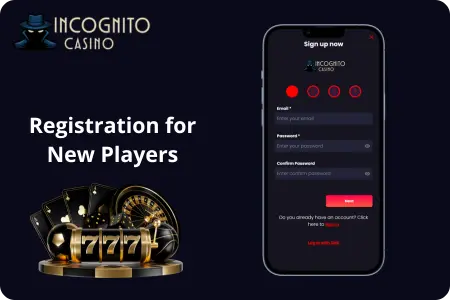
- Choose a username and password: set a unique username and a strong password that you will use for the standard Incognito Casino login route.
- Enter your email address: use an address you have regular access to, as account confirmation and password recovery links are sent here.
- Add your mobile number: required if you plan to use SMS login; also used for 2FA and account verification.
- Select your currency: choose GBP for a pound-denominated account; crypto or other fiat options are also on offer at the currency selection step.
- Confirm registration via email or SMS: click the activation link sent to your chosen contact method; the account remains restricted until this step is completed.
- Complete KYC before withdrawal: photo ID and proof of address are required before any cashout is processed; submitting documents early removes any hold when you are ready to withdraw.
Once registration and email confirmation are done, the account is fully active for deposits, gameplay, and bonus claiming. New UK players are eligible for the triple welcome package across their first three deposits, with the first stage covering a 100% match up to £500. The welcome bonus must be opted into from the Promotions section before the qualifying deposit is made; details on all current offers appear in the Promotions tab after Incognito Casino login, as it cannot be applied retrospectively after the deposit clears.
Why Players Choose Incognito Casino
Players in the UK pick our platform for a specific set of practical reasons rather than marketing claims. One account covers casino games, live dealer tables, and sports betting under one login, so there is no need to manage separate logins across different products. Our Incognito Casino login process supports two distinct access methods, and the GBP account means no currency conversion on deposits or withdrawals for UK players.

- 3,000+ games: slots, live tables, and RNG card games from recognised providers; full catalogue on mobile and desktop without a separate app.
- GBP accounts: deposits and withdrawals process in pounds with no conversion fees for UK players.
- Multiple login methods: email, username, and SMS code login; 2FA on all accounts for players who want an extra security step.
- Zero withdrawal fees: no platform fee on cashouts; crypto withdrawals process in under 30 minutes after KYC is cleared.
- Sportsbook included: pre-match and live betting on 55 sports including football, rugby, and cricket under the same account as the casino.
- Weekly promotions: free spins every Monday and Friday for depositing players, plus 15 daily spins for players with a qualifying deposit in the last 7 days.
- Curaçao Gaming Control Board licence: terms, responsible gambling tools, and deposit limits all accessible from the account settings.
- Live chat support: reachable without logging in; email support for account issues that require a written record.
For UK players who want casino and sports betting in a single account without being limited to GBP fiat payments only, the combination of crypto support and zero withdrawal fees addresses the two most common friction points at comparable platforms. Each Incognito Casino login session opens the full account across all product areas with no additional sign-in steps between the casino and sportsbook sections.